Claude Default
- Required
ANTHROPIC_API_KEY- Optional
ANS_CLAUDE_MODEL,ANTHROPIC_BASE_URL

Role-first governance for AI agents
Role-first organizing principle
ANS Studio organizes multiple AI agents into a team with roles, boundaries, dispatch, and independent acceptance—not a single assistant working alone.
The organizing principle is Role-first: define business responsibility and roles before modules and code ownership. Write authority comes only from role boundaries. Claude is the default engine; Pi and Codex are also available. The CLI supports demo, Pi, Codex, and Claude.
macOS 13+ / Windows 10/11 MIT License Native builds for three platforms
A model can write code, but it does not know who should own the result. Role-first puts the organization before the code: roles before modules, boundaries before writes, evidence before acceptance.
Define business responsibility and roles first, then modules and code ownership; the role card states duties, and Section 1 of boundary.yaml lists the paths a role may change.
Write authority comes only from role boundaries. Out-of-bound writes are rejected before side effects and pointed back to the correct owner. Shell commands go through the approval chain like everything else.
A report saying “done” is only a statement; Proof independently checks delivery and hand-back evidence before issuing an acceptance card.
Role-first lands as five built-in governance roles in new or empty projects. The three powers are proposal, team formation, and orchestration; communication and acceptance are not decision powers. None of the five holds final approval.
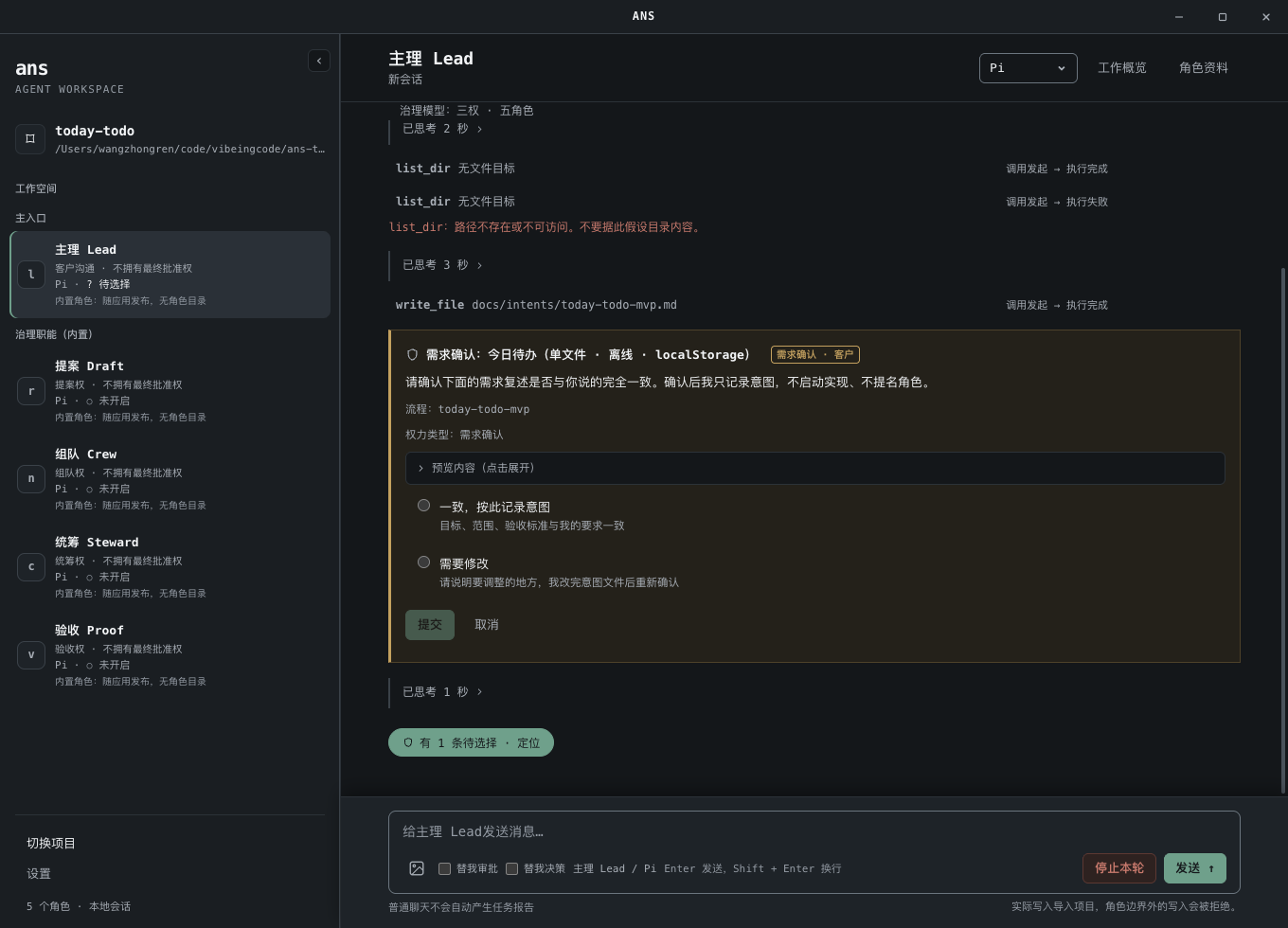
Customer communication and the default entry point; writes intent to docs/intents/; also acts as workflow manager.
Forms proposals and cross-role contracts.
Nominates project roles and writes role cards and boundaries.
Orchestrates the flow and dispatches tasks.
Independently checks evidence and issues acceptance cards.
None of the five holds final approval; final approval stays with you. Built-in roles ship with the app and have no role directories; their file writes are limited to governance files and evidence, and they do not implement or test.
An autonomous organization runs on process: each formal task moves in a fixed order, and every output lands in files or the ledger, ready to review and verify.
State goals, scope, and acceptance criteria to Lead; the intent is written to docs/intents/, and only passes to Draft after confirmation.
Draft forms a proposal and cross-role contracts from the intent; you choose accept, accept-quick, revise, or reject.
Nominates project roles and writes role cards and boundaries; appointments and each path write pass through confirmation.
Writes the flow record, orchestrates the flow, and dispatches formal tasks to project roles; tasks queue while a role is busy.
Project roles implement and test within their own boundaries, then hand back reports and evidence.
Independently checks delivery and hand-back evidence and issues an acceptance card; you decide accept or reject.
Role-first does not rely on the model's good behavior: writes, shell, and automatic judgment each have a gate on the execution path.
Role cards, boundaries, proposals, flows, acceptance, and file writes get a preview or confirmation card before writing; out-of-bound writes are rejected and pointed back to the correct owner.
write_file 角色卡/提案/… → rejected · owner: Draft / proposal
The example keeps the real repository path; role directories in this project are named in Chinese.
Every role has shell capability, and all of it goes through approval; a read-only allowlist runs directly; risky, review, and deny each require approval from you or the judge agent.
rm -rf build/ → approval card · runs only if approved
Read-only and fail-closed. Insufficient budget, insufficient evidence, unclear risk, or a missing intent all block automatic approval. A successful auto-approval is labeled “judge-approved” and never impersonates your click.
Auto-approve: on → judge-approved
Honest caveat: shell has no OS sandbox; file side effects of an approved command are not covered by the write gate; the approval chain is the only control. Open only projects you trust. See README current limitations.
Engines are the execution layer: switching engines does not switch the organization; role boundaries and gates stay on the same governance chain. Each engine uses its own configuration and never falls back to another engine when configuration is missing.
ANTHROPIC_API_KEYANS_CLAUDE_MODEL, ANTHROPIC_BASE_URLANTHROPIC_AUTH_TOKEN, ANS_PI_BASE_URL, ANS_PI_MODELCODEX_API_KEY or OPENAI_API_KEY, ANS_CODEX_MODELReleased 2026-10-20. The app bundle includes its own runtime, so launching the app needs no separate Node.js install; running project commands still requires the project's own development toolchain.
More release materials Release notes release-provenance.json overlay.patch SHA256SUMS-overlay.txt
Not signed or notarized: macOS Gatekeeper or Windows SmartScreen may warn that the source is unverified. Download from the GitHub Release and verify SHA256 before running.
ANS Skill is a role-first AI development skill inspired by the Role-First Software Governance (RFSG) paper; ANS is a name, not an acronym. Role-first comes from this paper, and ANS Studio turns it into a runnable desktop app and CLI: role cards, boundaries, and gates are implementations of its principles.
Wang, Zhongren. 2026. Role-First Software Governance: Asymmetric Authority Boundaries for AI-Native Agent Systems. DOI: 10.5281/zenodo.22824700